Hotel POS Integration: How to Connect Restaurant Billing, Room Charges and Guest Payments
Hotels often manage several revenue-generating services under one roof, including restaurants, cafes, bars, room service, and other guest facilities. When each operation uses disconnected systems, staff may need to enter transactions manually, verify charges more than once, or investigate billing differences during checkout.
Hotel POS integration connects point-of-sale transactions with the relevant hotel management or accounting workflows. Depending on the systems involved, this can allow authorized staff to post restaurant or room-service charges to a guest's account, maintain transaction records, and simplify the reconciliation process.
For hotels across Saudi Arabia, the UAE, Oman, and the wider GCC, understanding these workflows is important when evaluating hospitality technology.
What Is Hotel POS Integration?
Hotel POS integration is the connection between a point-of-sale system and other hotel software, such as a property management system (PMS), accounting platform, or payment solution.
A POS system records transactions at locations such as hotel restaurants, cafes, and retail counters. A PMS typically manages reservations, guest profiles, room assignments, and folios, which are records of charges and payments associated with a guest's stay.
When compatible systems are integrated, relevant information can move between them according to the integration's supported functions and permissions.
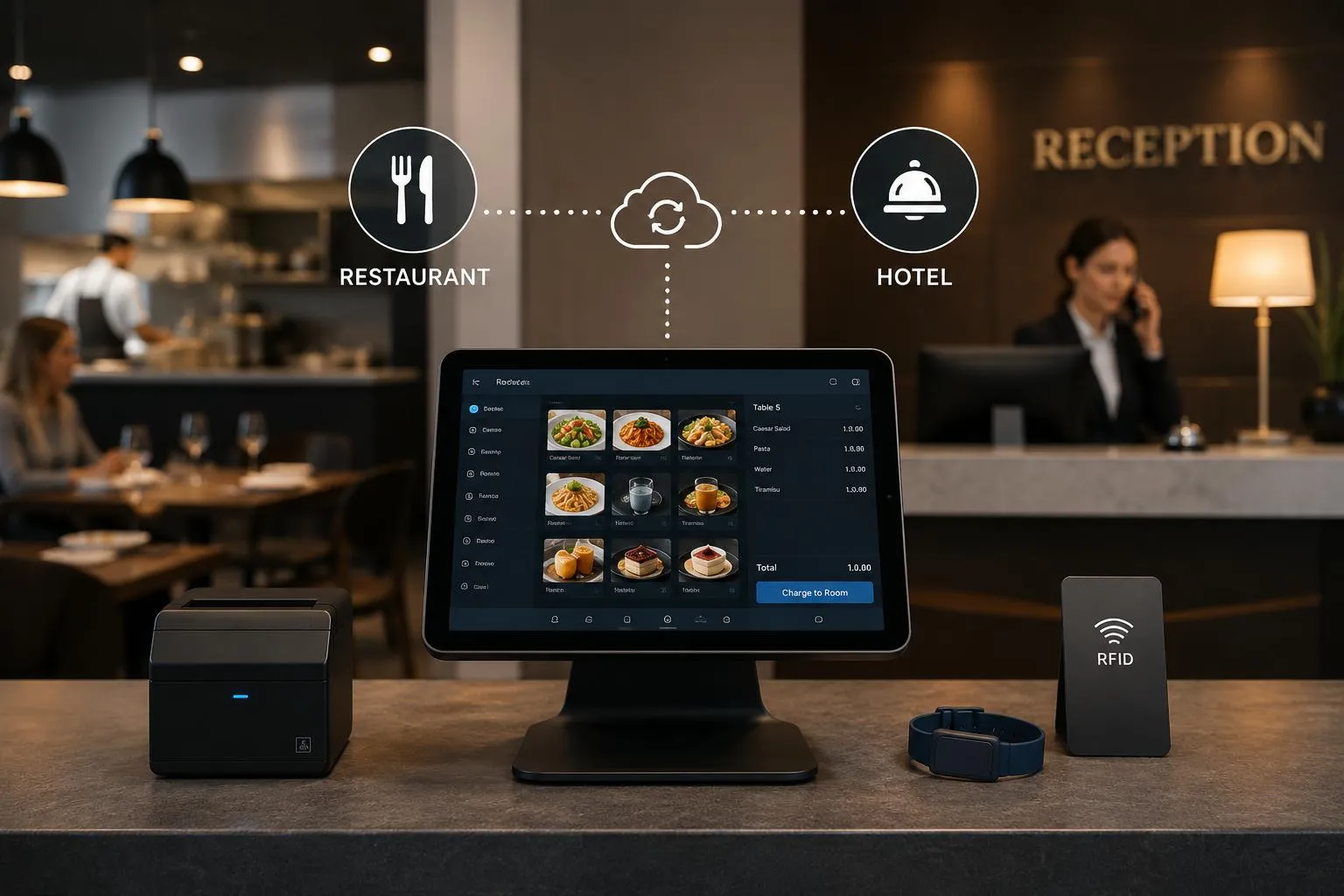
For example, a guest may dine at a hotel restaurant and ask for the bill to be charged to their room. With an appropriate integration, the restaurant transaction can be sent to the hotel system for posting to the correct guest folio.
The exact workflow depends on the PMS, POS software, configuration, and integration capabilities.
Why Hotels Need Connected Billing Workflows
1. Reduce Duplicate Data Entry
Without integration, staff may need to enter the same transaction into more than one system.
Manual re-entry adds work and can introduce errors in amounts, guest references, dates, or payment methods. A properly configured integration can transfer supported transaction details between systems and reduce repetitive entry.
Staff should still verify exceptions and follow the hotel's established financial controls.
2. Support Room-Charge Transactions
Many hotels allow eligible guests to charge restaurant purchases or room-service orders to their room.
To support this process, the POS and hotel system need a reliable way to identify the guest or room, validate the charge where required, and record the transaction.
Hotels should establish procedures for confirming guest identity, checking authorization, handling declined charges, and correcting incorrectly posted transactions.
Not every POS integration supports room posting, so this capability should be confirmed before a purchase decision.
3. Improve Billing Visibility
Guests may use several services during a stay. When the relevant systems share transaction data, authorized hotel staff can more easily review charges associated with a guest's account.
This is particularly useful when a guest requests an explanation of a restaurant charge or when the front desk needs to review outstanding amounts before checkout.
The integration should clearly distinguish posted charges, pending transactions, refunds, and payments.
4. Support Financial Reconciliation
Hotels need to reconcile sales recorded by restaurants and other outlets with payment records and accounting information.
An integrated workflow can help finance teams identify which transactions were paid directly, which were posted to guest accounts, and which require additional review.
However, integration does not eliminate the need to reconcile card settlements, cash receipts, refunds, and other adjustments.
How a Hotel POS-to-PMS Workflow Works
A typical room-charge workflow involves several steps.
Step 1: Record the Purchase
A guest purchases food or beverages at the hotel restaurant. The cashier records the items, applicable taxes, discounts, and other required details in the POS.
Step 2: Select the Payment Method
The guest chooses an available payment method. If the hotel permits room charging, the cashier selects the appropriate room-charge option.
Step 3: Validate the Guest or Room
The workflow should verify the required guest or room information and apply the hotel's authorization rules.
Depending on the integration, this may involve selecting a room, checking the guest's details, or receiving confirmation from the hotel system.
Step 4: Transfer the Transaction
If the integration supports room posting, the POS sends the required transaction details to the PMS.
The receiving system should provide an appropriate success or failure response. Staff need a clear procedure for handling timeouts, rejected transactions, and duplicate submission risks.
Step 5: Review the Guest Folio
Authorized staff can review the posted restaurant charge in the guest's account or folio, subject to the hotel's system configuration.
Step 6: Complete Checkout and Reconciliation
When the guest checks out, the hotel follows its billing procedures to settle outstanding charges.
The restaurant sale, guest folio, and final payment should remain traceable so that finance staff can investigate discrepancies if they arise.
This is an illustrative workflow. Actual steps and capabilities vary between POS and PMS products.
Common Hotel POS Integration Challenges
Incompatible Systems
Not every POS system supports every PMS. Some connections use certified integrations, while others depend on APIs, middleware, or custom development.
Before implementation, confirm that the systems can exchange the required data and that the integration is supported for the relevant software versions.
Incorrect Guest or Room References
A room-charge transaction must be associated with the correct guest or room. Incorrect selection can create billing disputes and additional work for reception and finance teams.
Hotels should define clear verification steps and make transaction references available for investigation.
Network Interruptions and Failed Transactions
Connectivity problems can interrupt communication between systems. A POS transaction may be recorded even when the room posting has not been confirmed.
The integration should make transaction status visible and provide a safe recovery process. Staff should not repeatedly resubmit a transaction without checking whether the original request succeeded.
Refunds and Corrections
Refunding a restaurant purchase may require changes in the POS, payment records, and guest folio.
The hotel should document which system initiates the correction, how the other systems are updated, and who can authorize adjustments.
Tax and Accounting Configuration
Different transaction types may require different tax, revenue, or accounting treatment.
Hotels should work with their finance team and software implementation provider to confirm the correct configuration for the relevant jurisdiction and business model. Software integration alone does not guarantee tax compliance.
What to Check Before Choosing a Hotel POS System
Hotels should evaluate the actual workflows they need rather than relying on a general promise of integration.
Ask prospective providers these questions:
- Does the POS integrate with our current PMS, and is the integration supported for our software versions?
- Can restaurant and room-service transactions be posted to guest folios?
- How are room-charge authorization and guest verification handled?
- What happens when the network is unavailable or a transaction fails?
- Can staff identify and investigate duplicate or unmatched transactions?
- How are refunds, corrections, and cancelled transactions synchronized?
- What reports are available for sales, payment methods, and reconciliation?
- Which implementation, licensing, or third-party integration costs apply?
- What training and support are provided during deployment?
A demonstration should use realistic hotel scenarios, including a successful room charge, a rejected transaction, a refund, and a connectivity interruption.
Hotel POS Integration and Data Security
Hotels handle guest information and financial transactions, so access controls and data protection are essential.
Limit room-charge permissions to authorized staff. Use appropriate authentication, protect system connections, maintain audit records, and establish procedures for access removal when employees leave.
The integration should transfer only the information needed for the relevant business process. Hotels should also confirm how transaction records are stored, protected, and retained.
Payment card information should be handled according to the applicable security requirements and the payment provider's supported procedures.
How to Plan a Successful Integration
A practical implementation should begin with a clear scope.
First, map the hotel's current workflows across the restaurant, reception, room service, finance team, and payment providers. Identify where data is entered manually and where billing discrepancies occur.
Next, confirm technical compatibility, integration responsibilities, supported transaction types, and data requirements. Define how failures and corrections will be handled before the system goes live.
Test the integration using representative transactions, including successful charges, declined requests, refunds, and duplicate-submission scenarios. Train staff on both the normal workflow and the recovery process.
Finally, monitor transaction exceptions and reconciliation results after deployment. Review unresolved items regularly and adjust the workflow when recurring issues appear.
Final Thoughts
Hotel POS integration can connect restaurant billing with guest accounts and other hotel operations when the selected systems support the required workflows.
The best implementation is not necessarily the one with the longest feature list. It is the one that supports the hotel's actual transactions, provides clear error handling, protects guest information, and allows staff to trace charges from the original sale through to settlement.
WaslaSoft offers business software solutions for multiple industries. Hotels considering a POS solution should confirm the available hospitality integrations, room-charge functionality, and implementation requirements directly with the provider before making a decision.
Visit WaslaSoft to explore its business software solutions and discuss your operational requirements.