In the modern retail economy, few commercial sectors operate under higher transaction volume, tighter profit margins, or greater logistical complexity than supermarkets, grocery chains, and hypermarkets. Operating in the fast-growing commercial markets of Saudi Arabia, the United Arab Emirates, and Oman, grocery businesses face unique operational challenges: managing tens of thousands of fast-moving consumer goods (FMCG), preventing inventory shrinkage, handling perishables with short shelf lives, and keeping checkout lines moving at lightning speed.
In a grocery environment where net profit margins typically hover between 2% and 5%, the difference between commercial failure and explosive profitability lies entirely in operational efficiency. A checkout bottleneck that delays a customer by three minutes causes cart abandonment. An untracked pallet of yogurt that expires in a backroom warehouse evaporates a week of profit.
To conquer these challenges, grocery and supermarket brands require a modern Point of Sale (POS) and Enterprise Resource Planning (ERP) platform built specifically for high-velocity retail.
In this definitive 2026 guide, we explore the essential pillars of supermarket POS architecture: high-concurrency barcode scanning, integrated weighing scales, batch and expiry date tracking, automated purchase replenishment, shrinkage prevention, and total regulatory compliance under ZATCA Phase 2.
1. The Anatomy of Modern Supermarket Friction: Why Generic POS Fails
Many grocery owners attempt to launch with a generic retail POS software designed for clothing boutiques or electronics stores. This inevitably leads to severe operational breakdown:
- Slow Checkout Lanes and Long Customer Queues: Generic systems lack optimized keyboard hotkeys, omnidirectional barcode scanner drivers, and sub-second receipt printing, causing painful checkout delays during evening rush hours.
- Weighing Scale Disconnect: Cashiers are forced to manually type weights from separate physical scales, leading to transcription errors, deliberate under-weighing (sweethearting), and revenue leakage.
- Perishable Food Waste & Expired Stock: Without automated expiry date tracking and FIFO (First-In, First-Out) stock depletion, expired food items reach display shelves, resulting in customer complaints and regulatory health inspection fines.
- Stockout Disasters of Core Household Staples: Running out of milk, rice, bread, or cooking oil drives customers straight to competitors. Generic software fails to calculate dynamic lead times and automated reorder points.
- Multi-Unit Pricing Confusion: Inability to link a single bottle of water, a 6-pack shrink-wrap, and a 24-bottle master carton to one unified inventory master record causes stock discrepancies and inaccurate valuation.
Upgrading to an enterprise-grade hybrid supermarket POS resolves these bottlenecks from day one.
2. The 6 Critical Pillars of High-Performance Supermarket Systems
To operate profitably at scale, a supermarket management system must master six foundational capabilities:
Pillar 1: High-Speed Barcode Checkout & Concurrency
The front checkout counter is the engine of the supermarket. Every second saved per customer directly multiplies store throughput:
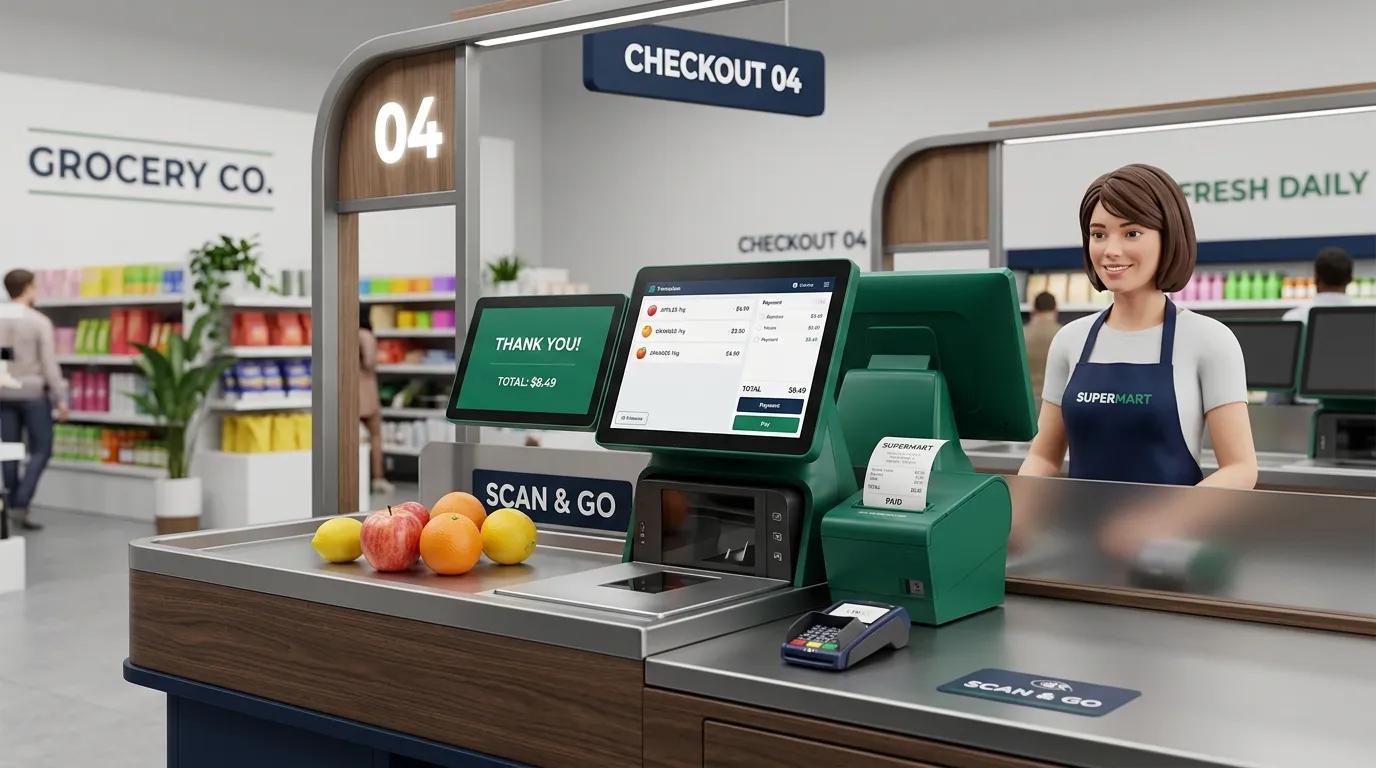
- High-Velocity Barcode Processing: Seamless integration with multi-line omnidirectional laser scanners and bi-optic in-counter scanners that read damaged, curved, or plastic-wrapped barcodes instantly.
- PLU Speed Keys for Fresh Produce: Fast visual touchscreen lookup for produce items without printed barcodes (e.g., loose bananas, lemons, fresh bread).
- Multi-Tender Payments: Split payments across Mada, Apple Pay, credit cards, loyalty points, and cash with instant automated change calculation.
- Customer-Facing Displays (CFD): Secondary screens showing scanned items, promotional discounts, and running totals, fostering trust and complying with consumer protection laws.
Pillar 2: Integrated Electronic Weighing Scales
Fresh produce, butchery, deli, and bakery sections require precise weight-to-price synchronization:
- In-Counter Scanner Scales: Dual-function scale/scanners embedded in the checkout counter send real-time weight directly to the POS software via serial or USB protocols, eliminating manual data entry.
- Price-Embedded Barcodes (EAN-13): Pre-pack scales in the butchery or deli print barcodes containing the item department, product code, net weight, and price check digit. The POS scans and interprets these instantly.
- Automatic Tare Weight Deduction: Automatically deducts packaging weight (trays, plastic bags, plastic containers) to ensure consumers are billed strictly for net food weight.
Pillar 3: Batch, Lot Number & Expiry Date Management
Preventing perishable spoilage requires proactive stock rotation controls:
- FIFO (First-In, First-Out) Tracking: Incoming purchase batches are tagged with manufacture dates, arrival dates, and expiry dates. Older stock is prioritized for front-shelf merchandising.
- Automated Near-Expiry Alerts: Configurable notification thresholds (e.g., 30-day, 14-day, and 3-day alerts) identify aging stock before it spoils.
- Dynamic Promotional Markdowns: Management can trigger automatic promotional price drops (e.g., Buy-1-Get-1 or 40% off) on near-expiry batches directly from the central dashboard, converting potential waste into recovered cash flow.
Pillar 4: Multi-Unit Packaging & Barcode Aliases
Grocery stores buy in bulk pallets and sell in diverse packaging sizes:
- Unit Hierarchy Linking: 1 Master Carton = 4 Boxes = 24 Single Packs = 144 Pieces.
- Unique Barcode Assignment: Each packaging level has its own barcode. Scanning a single piece deducts 1 unit; scanning a carton barcode deducts 24 units, automatically adjusting warehouse inventory without manual conversions.
- Wholesale Tiered Pricing: Automatic price breaks when customers purchase wholesale quantities.
Pillar 5: Automated Purchase Orders & Reorder Point (ROP) Formulas
Never run out of essential household items while avoiding overstocking dead capital:
- Dynamic Reorder Calculation: The POS calculates safety stock levels based on historical sales velocity, supplier delivery lead times, and seasonal spikes (e.g., Ramadan, Eid, National Day).
- Automated Purchase Orders (PO): When inventory dips below the safety threshold, the system automatically drafts supplier purchase orders.
- Goods Received Note (GRN) Matching: When delivery trucks arrive, warehouse staff verify quantities using handheld mobile barcode scanners, instantly flagging discrepancies against supplier invoices.
Pillar 6: Shrinkage Prevention & Loss Prevention Audits
Internal theft, cashier errors, and damaged items represent the largest drain on supermarket profits:
- Blind Shift Reconciliations: At the end of a shift, cashiers enter the physical cash, card slips, and vouchers in their drawer without knowing the theoretical total calculated by the system, eliminating cash skimming.
- Manager Authorization Controls: Strict permissions for item voids, line deletions, transaction cancellations, and manual price overrides with mandatory reason codes.
- Rolling Cycle Counts: Instead of shutting down the store for an exhausting annual inventory count, staff conduct daily rolling cycle counts of high-value categories (e.g., baby formula, cosmetics, premium meat) using mobile terminals.
3. Traditional Retail Cash Register vs. WaslaSoft Supermarket POS
| Core Capability | Legacy Electronic Cash Register | WaslaSoft Hybrid Supermarket POS |
|---|---|---|
| Checkout Speed | 8 to 12 items per minute | 25 to 35 items per minute |
| Weighing Scales | Separate scale with manual typing | Fully integrated in-counter & pre-pack barcode scales |
| Multi-Branch Control | Disconnected data on local hard drives | Unified cloud master dashboard for all branches |
| Expiry Date Management | Manual visual shelf inspections | Automated FIFO alerts and dynamic markdown rules |
| Packaging Multi-Units | Separate manual entries for box and piece | Automatic hierarchy (Carton / Box / Piece) |
| Internet Outage Resilience | Cloud POS freezes; legacy POS loses sync | 100% offline billing with auto-sync when online |
| ZATCA Phase 2 E-Invoicing | Requires expensive third-party middleware | Native direct API integration with sub-second QR code |
| Supplier PO Automation | Manual phone calls and paper notebooks | Automated Reorder Points (ROP) & digital GRN matching |
4. Regional Compliance: ZATCA Phase 2 for Supermarkets
In Saudi Arabia, high-concurrency retail environments are strictly regulated under ZATCA Phase 2 (Fatoora) requirements:
- Sub-Second Generation of Simplified Invoices (B2C): In a busy supermarket with six lanes and hundreds of items scanned every hour, an invoice cannot take 5 seconds to process. WaslaSoft generates cryptographic stamps, SHA-256 hashes, and 9-tag QR codes in milliseconds.
- The 24-Hour Reporting Grace Period: Simplified B2C invoices must be reported to ZATCA within 24 hours of issuance.
- Zero-Downtime Offline Assurance: If store fiber or 5G internet fails during Friday evening rush hour, cashiers must not stop scanning. WaslaSoft signs all invoices locally on the terminal hardware and queues them for automatic background reporting the moment the internet connection recovers.
5. Step-by-Step Hardware & Software Setup for Supermarkets
Launching or upgrading a modern supermarket involves four structured steps:
Step 1: Master Product Database Standardization
Cleanse your product catalog. Import international GTIN / EAN-13 barcodes, define standardized categories and sub-categories, establish shelf locations (Aisle / Bay / Shelf), and input initial opening balances.
Step 2: Checkout Lane Hardware Ergonomics
Equip cashiers with durable, professional hardware designed for continuous 18-hour daily operation:
- All-in-one touch POS terminals with high-speed processors and SSD storage.
- High-speed thermal receipt printers (250mm/sec) with automatic paper cutters.
- Bi-optic in-counter barcode scanner scales or omnidirectional presentation scanners.
- Heavy-duty steel cash drawers with multi-coin and bill slots.
- Dual-sided customer-facing displays (CFD).
Step 3: Warehouse & Storeroom Setup
Equip receiving staff with rugged handheld Android mobile computers (PDAs) with built-in barcode scanners for fast stock receiving, inter-branch transfers, and price verification.
Step 4: Cashier Training & Simulation
Train cashiers on keyboard speed keys, return procedures, and loyalty lookups. Because WaslaSoft features an intuitive Arabic and English touch interface, new cashiers achieve peak scanning velocity within 45 minutes of training.
6. The Financial ROI: How WaslaSoft Boosts Supermarket Margins
Investing in WaslaSoft Hybrid POS delivers tangible financial returns across your operations:
- Reduce Inventory Shrinkage by 60%: Granular audit trails, blind drawer counts, and rolling cycle counts eliminate mysterious stock disappearances.
- Accelerate Lane Checkout Speed by 45%: Bi-optic scanner integration and instant payment processing shorten customer queues and capture more daily foot traffic.
- Cut Spoilage Losses by 20%: Automated near-expiry notifications allow you to clear fresh products with promotional pricing before they reach expiration.
- Prevent Stockout Revenue Loss: Automated purchase orders ensure your shelves never run out of fast-moving household essentials.
Conclusion: Transform Your Supermarket Operations with WaslaSoft
Operating a profitable supermarket or grocery business in Saudi Arabia and the GCC demands flawless execution at the checkout lane and airtight control in the warehouse. Don't let slow cash registers, inventory leaks, or non-compliant software undermine your hard work.
With WaslaSoft Hybrid Supermarket POS & ERP, your checkout lanes scan faster, your warehouse operates with pinpoint precision, and your business remains 100% compliant with ZATCA Phase 2 regulations around the clock.
Ready to Modernize Your Supermarket?
Discover how WaslaSoft streamlines high-volume grocery operations. Book your personalized free supermarket demo today and speak with our retail specialists in Riyadh and Jeddah.